





If you spend several hours watching live broadcasts, you have probably seen the chat explode with notifications about a generous viewer who just dropped a bundle of community subscriptions.
Subscribing to a channel is nice, but before you hit the purchase button, you need to know the exact financial breakdown.
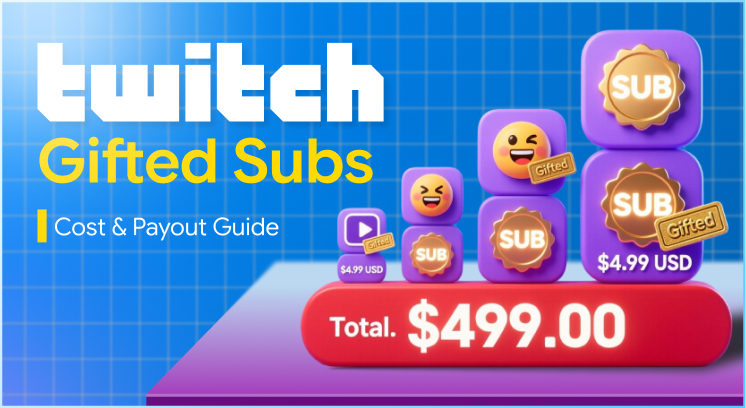
A standard desktop purchase of Tier 1 costs $4.99 USD.
However, this amount may be misleading because the ultimate cost can vary depending on the device to make the purchase, your country of residence, and your support level.
The guide below will demonstrate how much is a gifted sub on twitch that appears to cost when you buy a subscription to a channel on Twitch.
Key Takeaways (TL;DR)
Base cost: A standard first-tier gift subscription costs 4.99 USD when paid on a desktop computer.
Mobile tax: However, buying through the Twitch app on iOS or Android costs 5.99 USD because of extra mobile payment processing fees.
Streamer cut: Considering a standard 50/50 revenue split, the streamer would get 2.5 USD for a Tier 1 gift.
Regional pricing: This amount may vary significantly by country, for example, India or Mexico.
How Much Is A Gifted Sub On Twitch: The Complete Price
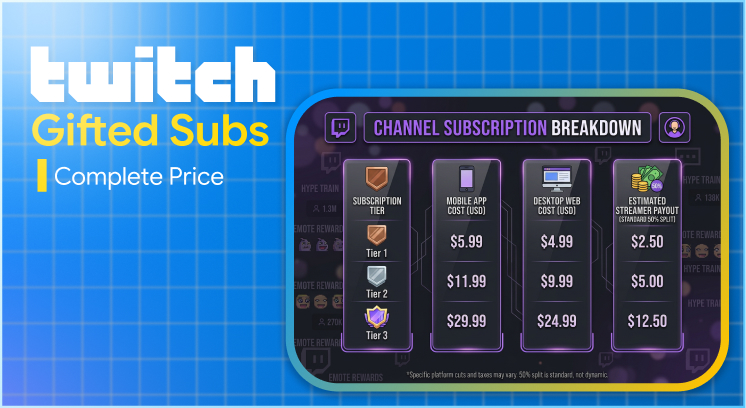
Twitch offers three subscription tiers. Each tier gives the recipient additional custom emotes, higher channel point multipliers, and greater community status.
Moreover, when you buy a gifted sub on a desktop computer or laptop browser, you pay standard web rates.
The base costs for a single gifted month follow a predictable ladder:
| Subscription Tier | Mobile App Cost (USD) | Desktop Web Cost (USD) | Estimated Streamer Payout (Standard 50% Split) |
|---|---|---|---|
| Tier 1 | $5.99 | $4.99 | $2.50 |
| Tier 2 | $11.99 | $9.99 | $5.00 |
| Tier 3 | $29.99 | $24.99 | $12.50 |
For example, if you decide to surprise a community member with a Tier 3 gift on your desktop browser, your credit card will be charged exactly $24.99 plus any applicable local sales tax.
The recipient easily receives premium channel perks for 30 days, and the streamer marks a major win for their monthly metrics.
The Mobile App Trap: Why Iphones And Androids Cost More
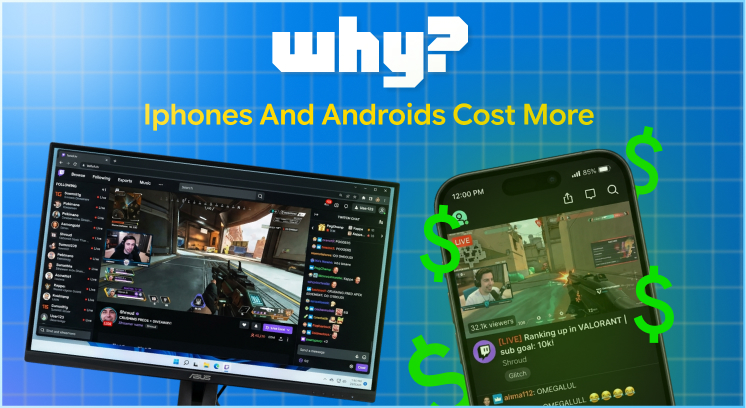
If you’re watching a stream on the official Twitch mobile app, prepare to pay premium.
Apple as well as Google take a 30% cut of purchases made through their own stores (the App Store and the Google Play Store).
To protect Twitch’s margins, they pass the additional operating costs directly to you.
Moreover, instead of paying $4.99 for a Tier 1 gift, mobile users must buy “Sub Tokens” or pay direct mobile rates. This pushes the cost up to $5.99 USD.
The Hidden Math Behind Mobile Gifting
Let’s take a look at buying a bundle of 10 gifted Tier 1 subs.
- On Desktop: 10 subs x $4.99 = $49.90 USD
- On Mobile: 10 subs x $5.99 = $59.90 USD
By choosing the mobile version of the app over the desktop/browser version, you’re paying an extra $10.00.
What’s worse is that none of it goes to the streamer. Big Tech storefronts pocket the 1 USD difference.
Moreover, if you want to stretch your budget to the absolute limit.
In such cases, you must always close the mobile app, open a browser window, and sign in to your Twitch account there before making community gift bombs.
Localised Pricing: How Geography Changes Your Total Cost
Twitch has implemented a new localised subscription pricing structure. Previously, a sub cost $4.99 USD no matter who you were or where you were located.
For people with incomes below $4.99 USD, this made it impossible to support YouTubers.
Now, when someone purchases a gifted subscription, the cost is calculated dynamically based on the purchaser’s billing address and country, so prices can vary drastically by region.
Some real-world examples (first column is Tier 1 desktop):
- United Kingdom: £3.99 GBP
- Eurozone: €3.99 EUR
- India: ₹110 INR (approximately $1.32 USD
- Mexico: $48 MXN (Approximately $2.40 USD)
Simply put, it checks the country of the person buying the sub, not the person receiving it.
So if I’m in India and I buy a gifted subscription to a channel in the United States, I will pay the cheaper Indian rate of ₹110.
Whereas if an American buys a gifted subscription to my channel, they will have to pay the nice round sum of $4.99 USD.
Note: Do not try to bypass this system using a Virtual Private Network (VPN). Twitch tracks payment method registration addresses and hardware locations. Trying to mask your true region to get cheaper gifted subs violates the official Terms of Service and often results in an immediate account ban.
How Much Do Twitch Streamers Actually Make From A Gifted Sub?
A huge difference exists between what a viewer spends and what a broadcaster actually earns to pay rent.
Moreover, many viewers assume that looking up how much a gifted sub pays on Twitch tells them exactly how much income the creator has secured, but it doesn’t.
The standard contractual split for any creator, including your basic Twitch Affiliate or standard Partner, is 50% of the net subscription revenue.
The Financial Leakage: Net vs. Gross Income
Every single time we pay $4.99 for a web-based Tier 1 sub, Twitch will first deduct:
- Local Sales Taxes / VAT: This varies wildly from state to state and country to country.
- Payment Processing Fees: Credit card companies and PayPal take a cut
Once these baseline deductions are cleared, Twitch splits the remaining “net revenue” down the middle.
This means the streamer’s payout for a standard $4.99 gift sub is usually between $2.20 and $2.50 USD.
[Your 4.99Payment] ➔ Minus Taxes&ProcessingFees ➔ RemainingNetRevenue ➔ Split50/50 ➔ StreamerReceives~2.35
Top-tier creators who have earned high-volume Partner contracts or qualified for premium Partner Plus tiers can command a 60/40 or 70/30 split.
Under a 70% revenue split contract, you’d earn closer to $3.50 USD per Tier 1 sub.
However, you have to look at their entire monetization suite to see how much Twitch streamers make overall.
While subscriptions provide steady recurring monthly income, smart creators diversify by setting up Twitch donations through third-party alert systems.
This includes Streamlabs or StreamElements, linked to a personal business PayPal account.
Moreover, external tips let creators bypass the 50% platform cut and keep up to 95-97% of the total transaction value after basic payment processing fees.
Step-By-Step: How To Purchase A Gifted Sub
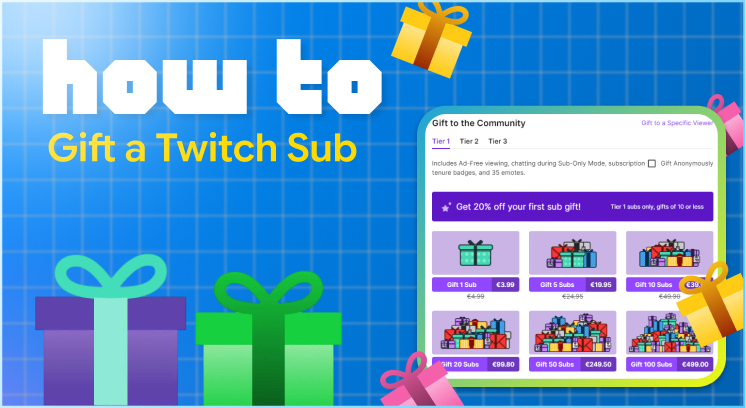
Gifting a subscription is simple, whether you want to reward a certain frequent watcher or randomly surprise the whole community.
Gifting To A Specific Community Member
- First, open the streamer’s chat box and locate the name of the person that you want to gift a subscription to.
- Then click on their name to open their user profile card, and click the Gift Sub button.
- After that, you can choose a subscription tier (Tier 1, 2, or 3) and pay for a gift.
- Also, Gifting Randomly for the Community (Gift Bombs)
- Lastly, click the purple Subscribe or Gift a Sub button in the top right corner of the live video player.
You Have To Click The Gift A Sub Tab
- Choose the amount of random community gifts. Twitch provides quick select buttons that include standard 1, 5, 10, 20, 50, or 100 subscriptions,
- You can check the box that says Gift Anonymously if you want to hide your username on the alert stream.
- Choose the method for payment and click Complete. The subscriptions will be gifted to active community members who aren’t subscribed or who frequently watch the channel.
Alternative Ways To Grow Your Channel And Community
If you are an emerging broadcaster looking for ways to stream on Twitch productively, relying on gifted subs will get you nowhere.
To grow your channel on a larger scale and build a high-tier presence, you need more than gifted subs.
Remember that Twitch is, first and foremost, an interactive platform where engagement drives everything.
Simply broadcasting gameplay doesn’t make you a creator capable of building a brand empire around your content.
With that being said, here are some valuable suggestions on how to grow on Twitch:
Hit Affiliate Status
First, focus on the initial setup and onboarding metrics that get you to the next level right after signing up.
This way, you can reach Twitch Affiliate status and gain access to bits, subs, and advertising.
Drive Organic Traffic
Secondly, instead of relying on people stumbling upon your content, actively drive traffic to the channel.
One way to do this is to post short vertical videos on TikTok and YouTube Shorts with gameplay clips to market the channel there.
Retreat If Necessary
Thirdly, if you decide the online space isn’t for you, you can simply delete the account to avoid any obligations.
Always remember to delete your Twitch account forever in your privacy settings to erase all personal data from the servers.
One invests in future subs and viewers who will actively support the channel over time. They just need to engage with the community regularly and drive organic traffic from outside sources.