









How to set up donations on Twitch? Let’s find out!
Starting out as a new streamer is an exciting grind, but waiting until you reach official Twitch Affiliate status to earn from your content can feel discouraging.
Building an active community takes time, energy, and often an investment in your gear.
The good news is that you don’t have to wait for Twitch’s green light to begin accepting financial support from your viewers.
By setting up an external tipping system, you can start building a financial foundation for your channel from day one.
This guide walks you through setting up donations on Twitch safely, configuring live on-screen alerts.
It can also help protect your privacy so viewers never see your real name or home address on receipts.
Quick Summary (TL;DR)
Let’s say you want to accept direct tips on Twitch without reaching Affiliate status.
The most secure path is connecting a PayPal Business Account to a third-party broadcasting suite like Streamlabs or StreamElements.
This method keeps your legal name hidden from donors. While Twitch offers built-in tools like Bits and Subscriptions later on, direct third-party tipping links let you keep a higher percentage of your earnings from day one.
Why Direct Tipping Matters For New Streamers?
Twitch monetization generally falls into two categories: native platform features and external third-party integrations.
When you first launch your channel, native features like Subscriptions and Bits are locked behind the Twitch Affiliate Program.
To qualify, Twitch requires you to meet specific broadcast milestones, including reaching 50 followers and maintaining an average of three concurrent viewers over a 30-day window.
If you are just starting out, waiting for Affiliate status can feel limiting. This is where external tipping setups become highly valuable.
By placing a custom graphic panel beneath your video player, you can direct viewers to an external payment processor.
This approach offers an immediate financial runway. It also shifts the revenue split in your favor.
Twitch typically takes a 30% to 50% cut of subscriptions and a portion of Bits revenue to cover processing costs.
External processors charge noticeably lower transaction fees, leaving more money for your operations.
How To Set Up Donations On Twitch: Difference Betweem Bits, Subs, And Direct Tips
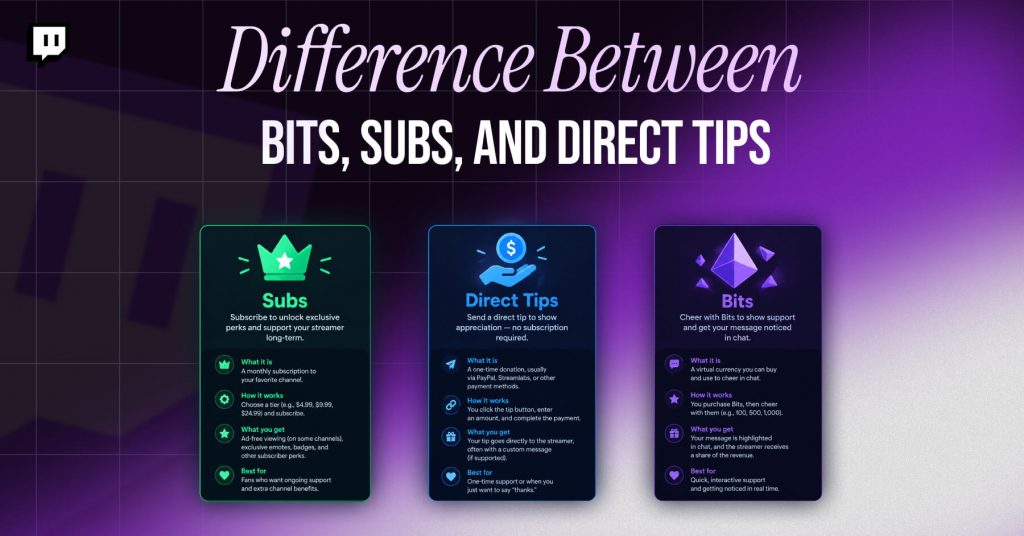
Before linking a bank account to your channel, understand how these revenue streams work.
Mixing them up can create unexpected accounting headaches at the end of the fiscal year.
| Monetization Method | Twitch Affiliate Required? | Average Platform Cut | Payout Schedule | Primary Risk |
|---|---|---|---|---|
| Twitch Bits | Yes | ~20% (paid by viewer up front) | Net 15 days after hitting $50 | Low (Twitch handles fraud) |
| Twitch Subscriptions | Yes | 30% to 50% | Net 15 days after hitting $50 | Low (Twitch handles fraud) |
| Direct Tips (PayPal/Stripe) | No | ~2.9% + $0.30 per transaction | Immediate to your merchant account | High (Viewer chargebacks) |
Now, direct tips can get you cash the fastest. However, they put the burden of fraud prevention entirely on you.
If a viewer sends you $50 and then disputes it with their credit card company, you could face hefty chargeback fees if your account isn’t protected.
How To Set Up Donations On Twitch: The Steps
If you are trying to set up donations on Twitch, here are the steps that you need to follow to understand “how do i set up donations on twitch”:
Step 1: Set Up A Dedicated PayPal Business Account
The worst thing you can do as a newcomer is link your day-to-day personal PayPal account to your Twitch channel.
When someone sends a tip to your email, the receipt they can view will show your full name and the personal email address linked to that PayPal account.
To keep your personal information private, you are going to have to convert your account to a PayPal Business Account or open a new PayPal Business Account.
This lets you protect your privacy by linking a studio name or nickname instead of your real name.
- Go to the official PayPal registration website
- Click Sign Up and select the Business Account option. Make sure you do not select Personal
- Enter your administrative email. It is better to use the separate email option for your stream, your contact@yoursteamname.com email, than your personal inbox
- As for your legal business name, enter the name of your stream alias or creative studio. This is the name that will appear on your viewer’s bank statements
- Set the type of business: if you do not have an officially registered company (LLC), select the Individual/Sole Proprietorship option
- Enter your legal name, address, and tax information. This information will be used for tax purposes but secured by PayPal.
Step 2: Bridge PayPal To Your Stream Software
The second step is to connect your PayPal account to your preferred stream. A direct PayPal link can look unsteady and insecure.
So the best fix is to use a third-party service to host it and make it look more trustworthy.
The two most popular options are Streamlabs and StreamElements. Let’s begin with the first one.
- Go to the Streamlabs website and log in using your Twitch credentials
- From the left-side panel, select Settings and then go to the Donation Settings tab
- Look for the PayPal (legacy) and PayPal Complete Payments options. Simply use the Log in button to log in to your newly created PayPal Business account
- From the left-side panel, select Donation Page Settings. Here you can customize your tipping page URL, set the minimum tip amount, and define the currency.
Note that your final URL will look something like this: https://streamlabs.com.
Streamlabs is also a popular choice among Twitch broadcasters.
- Go to the Streamlabs website and log in using your Twitch account.
- From the left-side panel, select the Revenue tab, then choose Tipping Setup.
- Enter your PayPal Business email address in the configuration field.
- Finally, click Save to generate your custom public tipping page link.
Step 3: Add the Tipping Link To Your Twitch Panels
The third step is to add your link to your Twitch panels so your viewers can actually find it.
It is a good idea to place a large, bright button there, so follow those instructions:
- Go to your channel on Twitch and click the Edit Panels button, which appears below your video
- Click the +1 button to create a new panel
- Add a text or image panel by clicking the Add a Text or Image Panel button
- Now, click the Add Image button and select the picture of the button you want to use
- Now, in the Image Links To text field, enter the link you obtained from StreamElements or Streamlabs
- Finally, in the description, write a note explaining what your viewer will receive in exchange for their money and submit your panel
How To Set Up Donation Alerts?

The final step is to configure the notification system, so you’re notified of every tip in real time.
- Go to the Streamlabs or StreamElements website and find the donation alert box
- From the left-side panel, select the Donations or Tips tab
- Now, click the Upload button and select the animated GIF of your choice.
It is also a good idea to add a short sound notification that will indicate that a viewer has tipped your channel.
Thus, you need to make sure you do not exaggerate with the volume
- Next, you will want to customize the text of your donation message. The most common way is to use the {name} just tipped {amount} text.
Use the tokens provided by the system to insert visitor names and tip amounts
- At the top of the window, you will see a unique URL called Widget URL. The only purpose of this link is to be embedded into your stream software. Do not share it publicly
- Finally, open your broadcasting software (or OBS Studio) and add a new source using the +1 button.
From the menu that appears, select the Browser option and paste the URL you received earlier.
Protect Yourself Against Chargebacks And Disputes
When you use this method, you expose yourself to the risk of viewer chargebacks.
A chargeback occurs when a viewer uses their credit card or PayPal account to make a tip and then dispute the charge with their bank.
They will most likely claim they did not authorize the transaction.
Once the bank accepts their claim, they will get their money back. And you will also have to pay a chargeback fee, usually $15 to $20 per dispute.
On the other hand, adding a disclaimer to your tipping page and your Twitch channel can protect you against several class-action lawsuits and complaints to PayPal or credit card companies.
A live stream is not a charitable event. You provide services and entertainment as an entertainer, and your viewers purchase them as such.
The Disclaimers And Refund Policy
You can use the following disclaimers to protect your earnings:
“By clicking the payment link and completing the transaction, you confirm that you are the rightful owner of these funds, and all tips are final, non-refundable, and cannot be charged back.
You are paying for live digital entertainment services, and no physical goods or commercial privileges will be provided in exchange for this payment.”
Now, this disclaimer will not protect you against every class-action lawsuit.
Moreover, it will be an invaluable document if you ever need to present a counterclaim to PayPal or a court of law.
On the other hand, a written disclaimer will protect you from all “consumer protection” lawsuits because your viewers will not buy anything they can return.
The Legal And Tax Implications Of Donations
Strictly speaking, a donation does not exist in the eyes of the law. It is a charitable contribution.
By definition, it must be made to a qualifying charitable organization. Qualifying charities are entities with a 501(c)(3) tax-exempt status or a nonprofit organization.
As an independent contractor, you are not considered a qualifying charity.
Therefore, your channel is a business asset for tax purposes. So, report any tips you receive as self-employment income.
Reporting Requirements
Depending on your country of residence, you may be subject to quarterly reporting requirements.
In some countries, third-party processors, such as PayPal, must issue you a 1099-K statement if you reach a specific threshold. In either case, you should report tips as income.
Naming Requirements
Make sure you use different terminology to describe the nature of the monetary exchange.
Such terms are Tip, Tip Jar, or Support. Using the word Donate can trigger legal issues with consumer protection authorities or even IRS accusations of tax evasion.